GoogleMaps (beta)
A self-contained GoogleMaps widget.
It provides useful functionality for finding somewhere on Earth.
All requests for map data are performed in the background, so the UI shouldn't become unresponsive.
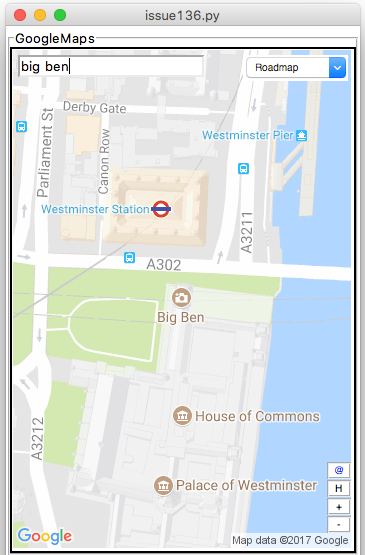
from appjar import gui

app = gui()
app.addGoogleMap("m1")
app.setGoogleMapSize("m1", "300x500")
app.go()
Add GoogleMaps
.addGoogleMap(title)
Creates a GoogleMap widget.
Displays a map image, and provides functionality to search, zoom, and change terrain, as well as a link to the original image.
Set GoogleMaps
-
.searchGoogleMap(title, location)
Update the named GoogleMap widget to show the specified location. -
.zoomGoogleMap(title, mod)
Change the zoom level of the named GoogleMap.
Providing a + or - will cause the map to zoom in or out one level.
Otherwise, a digit between 0 and 22 should be provided, to set the zoom level. -
.setGoogleMapTerrain(title, terrain) -
.setGoogleMapSize(title, size)
Set the size of the GoogleMap. Should be in the format"300x300".
Note, if you set it too small, the control widgets won't look good... -
.setGoogleMapMarker(title, location, size=None, colour=None, label=None, replace=False)
Will drop a marker on the specified location.
The marker will only be visible if the currentlocation&zoom levelpermit.
If an emptylocationis provided, all markers will be removed.
colourcan be set to any of (black, brown, green, purple, yellow, blue, gray, orange, red, white) or a hex value (starting '0x').
sizecan be set to any of (tiny, mid, small).
labelcan be set to a single letter or digit.
IfreplaceisTruethis marker will replace the last one added. -
.removeGoogleMapMarker(title, label)
Will remove the specified marker, if found.
Get GoogleMaps
-
.getGoogleMapLocation(title)
Returns the current displayed location.
Will return an empty String, if the user clicked the H button. -
.getGoogleMapZoom(title)
Returns the current zoom level of the map tile. -
.getGoogleMapTerrain(title)
Returns the current terrain setting for the map tile. -
.getGoogleMapSize(title)
Returns the current size of the map tile.
Save GoogleMaps
.saveGoogleMap(title, fileName)
Saves the currently displayed map to the named location.
By default, all map tiles are GIFs.